How to Check Aadhaar Card Mobile Number in 2026 (All Working Methods)
Linking a mobile number with your Aadhaar card is no longer optional—it is the master key to almost every UIDAI service. Without a registered mobile number, you cannot receive OTPs for e-KYC, updating your address, downloading e-Aadhaar, or lodging an online complaint. If you have ever wondered how to check which mobile number is linked to your Aadhaar card, we have gathered the most comprehensive and verified methods for 2026.
Why You Must Know Your Aadhaar-Linked Mobile Number Right Now
Every year, millions of Indians lose access to their Aadhaar services simply because the mobile number linked 5–10 years ago is no longer active. Banks reject loan applications, income tax portals show errors, and even PM-KISAN payments get stuck—all because the registered mobile number is inactive.
Knowing your Aadhaar linked mobile number helps you:
- Instantly receive OTP for any online Aadhaar service
- Update your address online without visiting an Aadhaar centre
- Lock/unlock Aadhaar biometric data
- Generate Virtual ID (VID)
- File online PVC card requests
Let us now show you every verified method to check your Aadhaar linked mobile number—starting with the fastest ones.
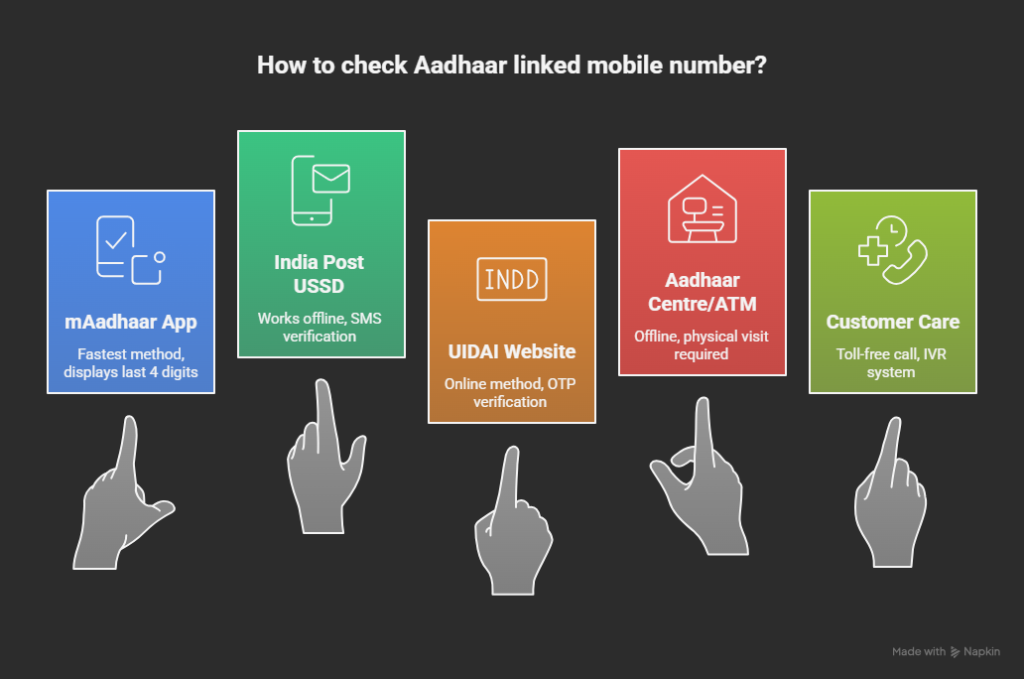
Method 1: Check Aadhaar Linked Mobile Number Using mAadhaar App (Fastest)
The official mAadhaar app remains the quickest way in 2026 to check your linked mobile number.
Step-by-Step Process:
- Download or update mAadhaar App from Google Play Store or Apple App Store
- Open the app and tap “Login”
- Enter your 12-digit Aadhaar number
- The system will attempt to send an OTP to your registered number
- When the OTP screen appears, check the top—mAadhaar displays the last 4 digits of your registered mobile number (for example, XXXXX XXX56)
- You now know which number is linked to your Aadhaar
Pro tip: Even if you no longer have access to that number, the app will still display the last 4 digits—this helps you identify which old number is still linked.
Method 2: Check Aadhaar Mobile Number via UIDAI Website (OTP Method)
- Visit the official UIDAI link: https://myaadhaar.uidai.gov.in/verify-email-mobile
- Enter your 12-digit Aadhaar number
- Enter the captcha code shown on screen
- Click “Send OTP”
- The moment you click, UIDAI sends OTP to the registered mobile number
- On the screen, you will see: “OTP has been sent to your registered mobile number ending with XXXX”
- The last 4 digits shown are from the mobile number linked to your Aadhaar
This method works even if you no longer have access to the registered number—the last 4 digits are displayed on screen for your reference.
Method 3: Check Through Aadhaar Enrolment Centre (Offline Method)
If you prefer visiting in person:
At Any Aadhaar Seva Kendra or Permanent Enrolment Centre:
- Carry your Aadhaar card or any proof of identity
- Request the operator: “Can you please tell me what mobile number is linked to my Aadhaar?”
- They will access the UIDAI portal and verify your registered mobile number
- The operator will inform you of the complete mobile number linked to your Aadhaar
At Select Bank ATMs:
Some banks (SBI, PNB, Bank of Baroda) offer Aadhaar services at ATMs:
- Insert your debit card and select “Services” or “Aadhaar Services”
- Look for “Mobile Number Check” or similar option
- Enter your Aadhaar number when prompted
- The screen displays your registered mobile number
Note: This service is not available at all bank ATMs—check with your bank first.
Method 4: Check Aadhaar Mobile Number via Customer Care (Toll-Free)
Call UIDAI helpline: 1947
- Select your preferred language
- Press 1 for Aadhaar services
- Follow IVR instructions to verify mobile/email
- Enter your 12-digit Aadhaar number using the phone keypad
- The system will provide information about your registered mobile number
This service is available 24×7 and completely free.
What to Do If Wrong/Old Mobile Number Is Linked?
If you discovered that an old or incorrect number is linked, you have these options:
Option A – Update Online (Only if you have access to the old number)
- Visit https://myaadhaar.uidai.gov.in
- Login with Aadhaar number and OTP (sent to old number)
- Note: As of January 2026, UIDAI has launched a new Aadhaar mobile app that allows you to update your mobile number using face authentication, eliminating the need to visit an Aadhaar centre
- A fee of ₹75 applies for mobile number updates via the new app
Option B – Update Offline (If you lost access to the old number)
You must visit the nearest Aadhaar Permanent Enrolment Centre or Aadhaar Seva Kendra with:
- Filled Aadhaar Update/Correction Form
- Any valid Proof of Identity (Passport, PAN, Voter ID, Driving Licence)
- Your new mobile number
- Pay ₹75 demographic update fee
- Complete biometric authentication (fingerprint/iris scan)
- Collect acknowledgement slip with URN for tracking
- Updates are typically processed within 5-10 days
Frequently Asked Questions (Updated January 2026)
Can I check someone else’s Aadhaar linked mobile number?
No. UIDAI never discloses the full mobile number for privacy reasons. Only the last 4 digits are shown to the Aadhaar holder during verification processes.
Is there any app that shows the full 10-digit number?
No genuine app or website can display the full number. Only Aadhaar enrolment centre operators can view the complete number for verification purposes.
My mAadhaar app is not showing the mobile number. What should I do?
Update the app to the latest version from Google Play Store or Apple App Store. Clear the app cache and try again. If the issue persists, contact UIDAI helpline at 1947.
How much does it cost to update my mobile number on Aadhaar?
As of January 2026, the fee for demographic updates (including mobile number changes) is ₹75 when done separately at an Aadhaar centre or via the new Aadhaar mobile app with face authentication.
Can I update my mobile number through the new Aadhaar app?
Yes. UIDAI launched a new Aadhaar mobile app in January 2026 that allows mobile number updates via face authentication technology, eliminating the need to visit Aadhaar centres. A fee of ₹75 applies and can be paid via UPI within the app.
I have two Aadhaar cards (old & new). Which mobile number is active?
Only the latest Aadhaar number is valid. Old cancelled numbers have no active services. If you have multiple Aadhaar numbers, contact UIDAI immediately to deactivate the duplicate.
Final Words
You now have four verified methods to check your Aadhaar linked mobile number in 2026—whether you have internet access, a smartphone, or need to visit a centre in person. These are the only official methods approved by UIDAI.
Never fall for fake websites or apps that promise to show “full mobile number linked with Aadhaar by name”—they are all scams designed to steal your personal information.
Save this guide, share it with family members, and ensure every Aadhaar in your household has an active mobile number linked. With the new 2026 mobile app update feature, keeping your Aadhaar details current has never been easier.
To understand ongoing Aadhaar processes and official instructions, refer to our independent My Aadhaar guide.