
Download Aadhaar Card: A Quick Guide
Do you want seamless access to important documents anytime? The Aadhaar Card makes this possible by serving as a reliable ID for every citizen. It carries a 12-digit unique number issued by the Government of India. It helps individuals to verify their identity and access essential services effortlessly. Nowadays, it is easier to download Aadhaar card than ever before.
The governing body, known as Unique Identification Authority of India (UIDAI), has upgraded its digital services to make the installation process smooth and hassle-free.
Download Aadhaar Card
Download your official Aadhaar card online. Get instant access to e-Aadhaar.
Understanding the Basics of e-Aadhaar
e-Aadhaar is the digital version of your physical Aadhaar Card. This virtual format is highly convenient to use. It can be easily downloaded, stored, and shared for verification or official purposes. This online ID contains the same information as the printed card, which includes:
- Your name & photograph
- Address
- Date of birth
- Gender
- Aadhaar number
Under the Information Technology Act 2000, e-Aadhaar acts as a legally valid and authentic electronic document. It’s an essential part of India’s move toward a digitally empowered society.
If you want to know whether you qualify for the e-Aadhar card or not, here are some points that can clear the air. To be eligible, you must:
- Be an Indian resident, a foreigner, or an NRI who has been in the country for over 12 months.
- Have Proof of Identity (PoI), Proof of Address (PoA), Proof of Date of Birth (PDB), and a birth certificate for children under 5 years of age.
How to Install an Aadhaar Card Online?
To ensure convenience, there are different digital platforms through which you can acquire your Aadhaar card online. Each method is designed to suit specific user needs and situations. Here’s a step-by-step guide:
Download Process via myAadhaar Portal
The myAadhaar portal is an intuitive online platform. It allows users to securely download their e-Aadhaar or Masked Aadhaar anytime. Built with a user-friendly interface, the portal ensures that individuals can manage their Aadhaar information efficiently. Here are the steps to install digital Aadhaar:
- Visit the My Aadhaar Portal: Go to the official website.
- Access the Download Section: Click on “Download Aadhaar” under the My Aadhaar tab.
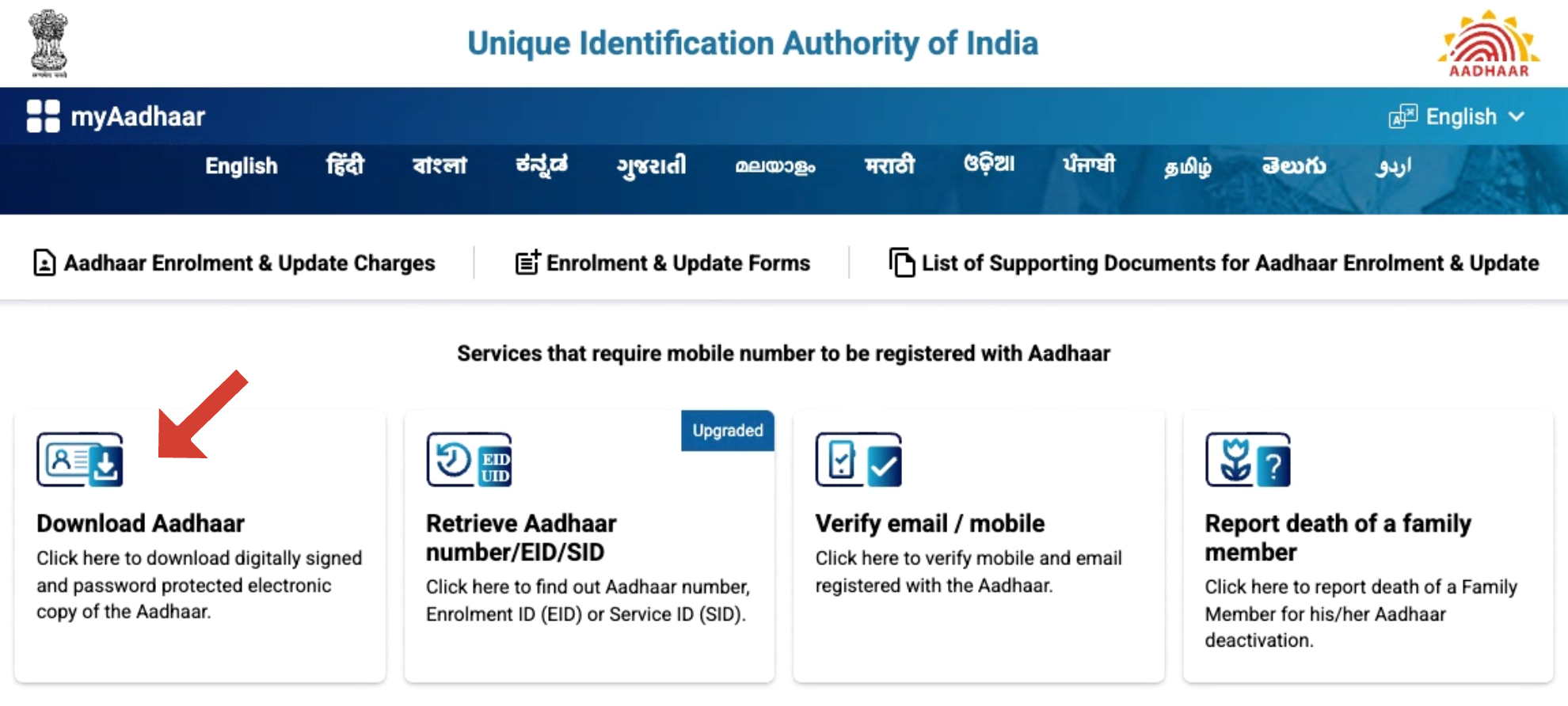
- Choose an Identification Option: Select one of the available options from Aadhaar Number, Enrolment ID (EID), or Virtual ID (VID).
- Enter Required Details: Provide the selected ID, fill in the captcha code, and click “Send OTP.”
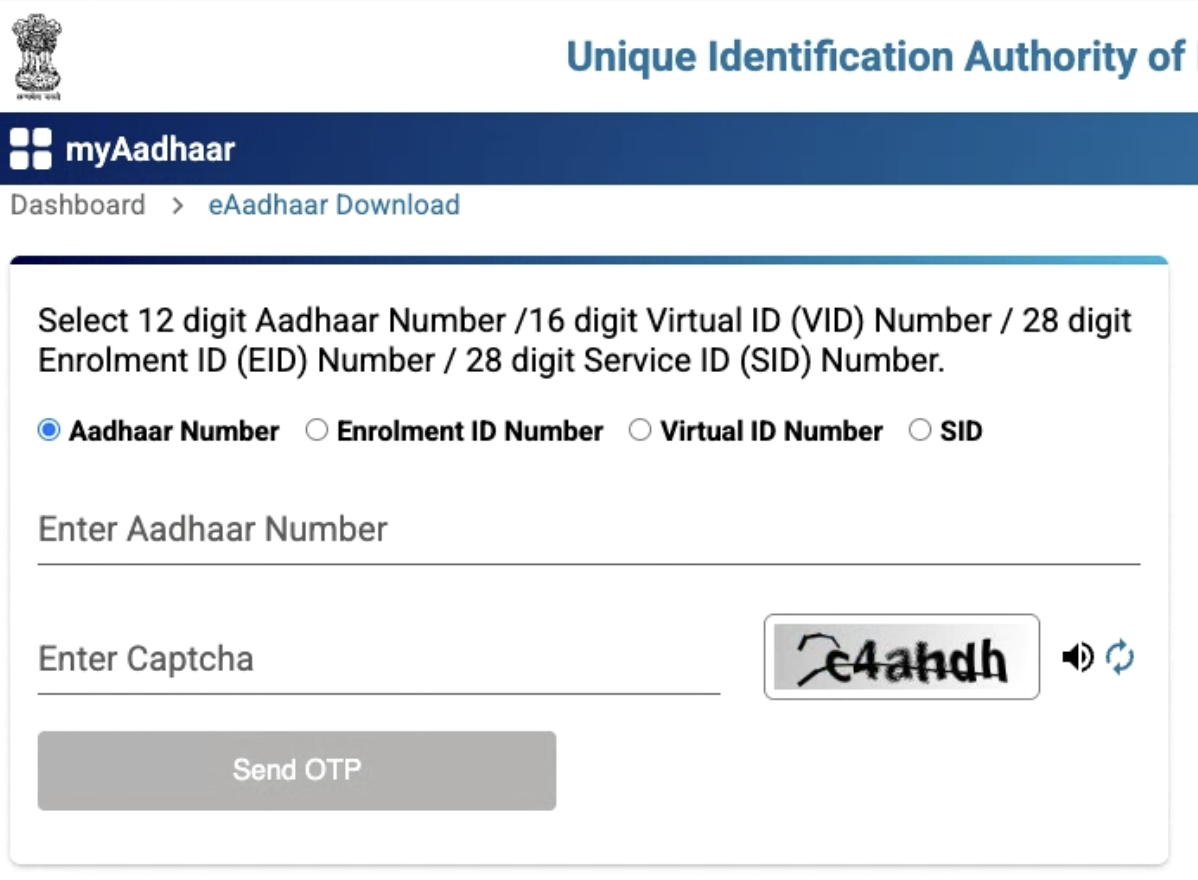
- Select Masked Aadhaar (Optional): Tick the option “I want a masked Aadhaar” if you prefer to encrypt the first eight digits of your Aadhaar number for enhanced privacy.
- Verify via OTP: Enter the one-time password received on your mobile number to authenticate your identity.
- Download Your e-Aadhaar: Once verified, click on “Download Aadhaar.” The file will be saved in PDF format.
- Open the File Securely: Use the password to open the PDF. It contains the first four letters of your name in CAPITALS, followed by your birth year.
Download Aadhaar using Enrollment ID (EID)
This process is best for those whose Aadhaar is still under processing or is misplaced. Here, you can use your Enrollment ID (EID) to get a digital copy. It’s printed on the acknowledgement slip you received during registration.
Steps to Download:
- Go to the official Aadhaar portal using a secure browser on your device.
- Select “Download Aadhaar.” Here, multiple identification options are provided.
- From the available options, select “Enrollment ID (EID)” and enter your 14-digit number.
- Add the captcha code and click “Send OTP.”
- Verify the OTP, and your e-Aadhaar PDF will be available for download.
Download Aadhaar using Virtual ID (VID)
The Virtual ID (VID) is a temporary, 16-digit number that can be generated from the UIDAI portal. It serves as a secure alternative to your Aadhaar number, helping protect your privacy.
Steps to Download:
- Firstly, visit the official UIDAI Aadhaar portal and click “Download Aadhaar.”
- Next, choose “Virtual ID (VID)” as your preferred method.
- Enter your 16-digit Virtual ID, the captcha code, and click “Send OTP.”
- Once received, open the SMS and type the OTP in the verification box shown on the screen.
- Then, click on “Verify and Download.” The system will authenticate your credentials using the OTP.
- After successful verification, your e-Aadhaar PDF file will automatically begin downloading to your device.
Download Aadhaar using Name and Date of Birth
If you have lost both your Aadhaar number and Enrollment ID, UIDAI provides an option to retrieve them using your personal details. This method is best for users who cannot recall their Aadhaar or EID.
Steps to Retrieve and Download:
- Log in to the official UIDAI page.
- Select whether you want to retrieve Aadhaar Number (UID) or Enrollment ID (EID).
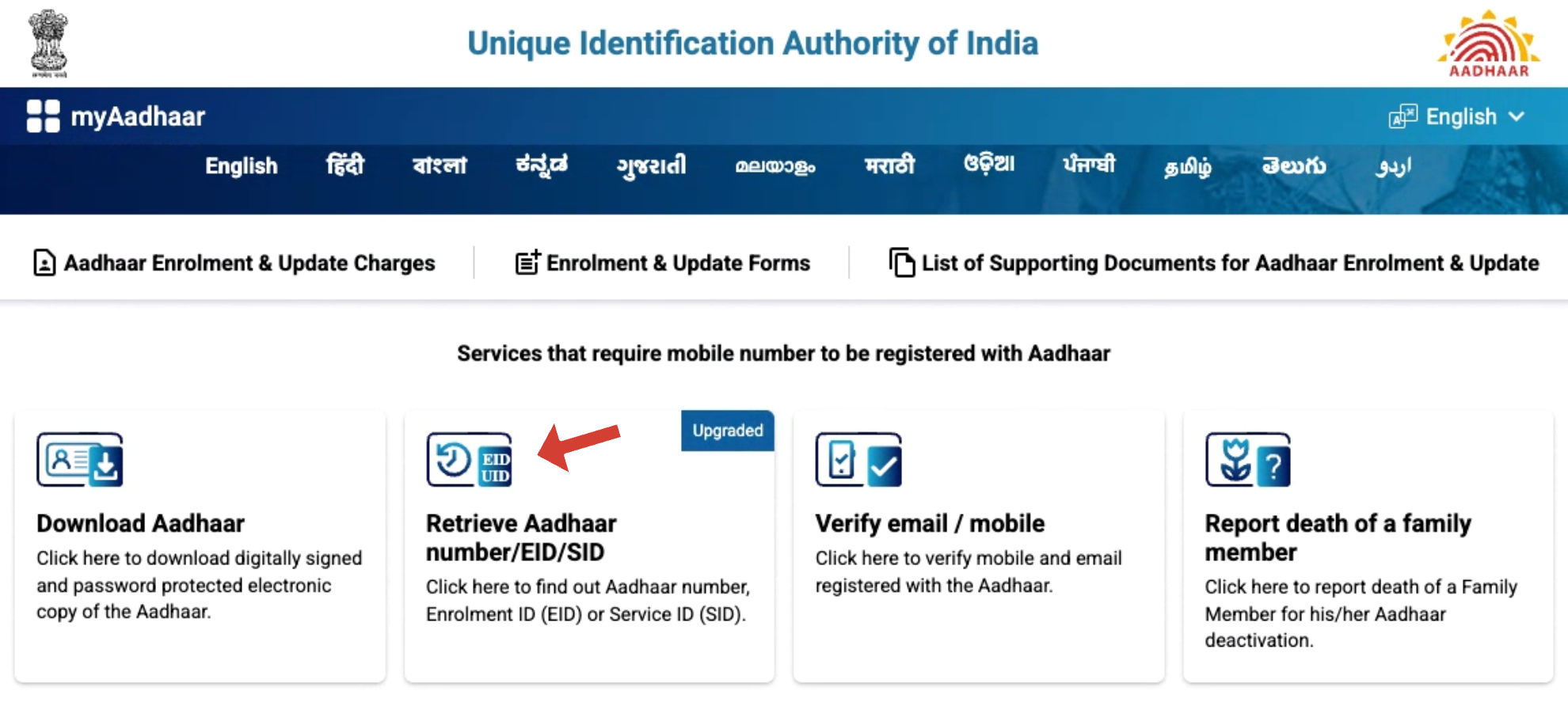
- Enter your full name, registered mobile number or email ID, and the captcha code.
- Click “Send OTP.”
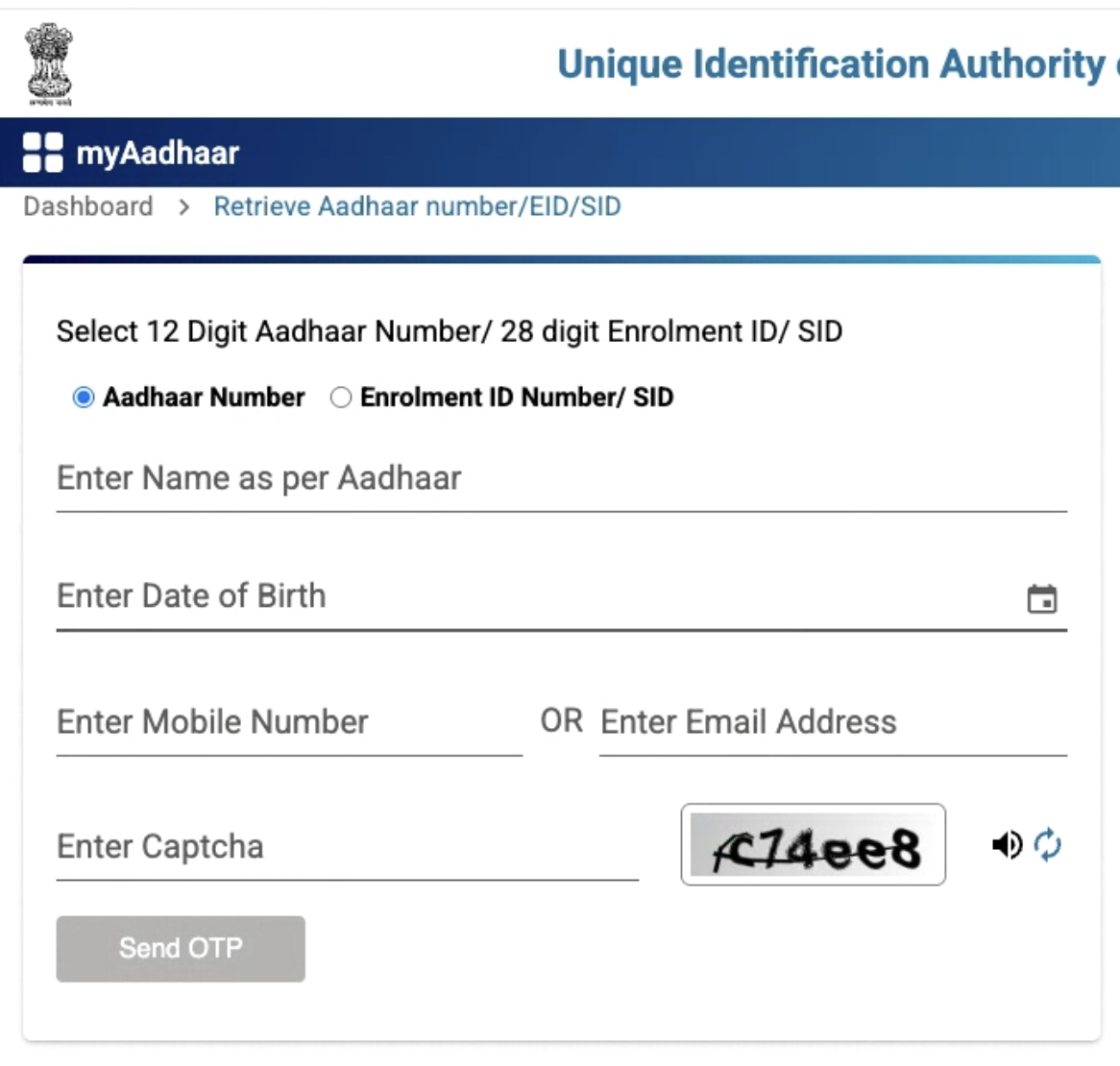
- After verification, you’ll receive your Aadhaar or EID on your registered contact.
- Use the retrieved number to download Aadhaar through the regular process described above.
Download Aadhaar via mAadhaar App
Developed by UIDAI, the mAadhaar offers a smart and secure way. It provides mobile users with instant access to their essential details.
Steps to Download:
- Download and install the mAadhaar App from the Android or Apple store.
- Open the app and register using your mobile number registered with Aadhaar.
- Once logged in, go to the “Download Aadhaar” section.
- Choose to download using Aadhaar Number, VID, or EID.
- Enter the required details and verify with an OTP.
- Your digital Aadhaar will be added to the app, accessible anytime.
Download via UMANG App
UMANG is a government-integrated platform. It allows users to easily download their Aadhaar card without visiting any physical center. Here are the steps:
- Install the UMANG app and log in with your mobile number and OTP.
- Select Aadhaar Card under All Services.
- Tap Download Aadhaar
- Enter your UID/EID/VID and captcha.
- Authenticate via OTP sent to your registered mobile.
- Download your e-Aadhaar PDF instantly.
Conclusion
Installing e-Aadhaar offers you convenient access to your digital identity. Other than that, you can also rely on it to access various government subsidies. Different methods are deployed for downloading this electronic version, from entering name and date of birth on the official UIDAI website to using third-party platforms. You should opt for the one that seems secure and convenient!
Need help with downloading, updating, or checking your Aadhaar status? Visit My Aadhaar UIDAI Guide — your trusted resource for everything Aadhaar.”