
Aadhaar Enrolment – Unique Identification Authority of India
Aadhaar enrolment is important because it provides you with a digital identity and access to public service delivery. It also facilitates financial inclusion and reduces fraud. But how to do Aadhaar enrolment? Are you eligible?
What are the documents required? We will go through everything in detail to make the process easier for you!
Aadhaar Enrolment
Book your Aadhaar enrolment appointment online. Find nearby centers and schedule your visit for new Aadhaar registration.
What is Aadhaar Enrolment?
Aadhaar enrolment is the process of registering an individual’s demographic and biometric data to get a 12-digit Aadhaar number. The biometric information includes fingerprints, iris scans, and a photograph, while the demographics involve age, gender, name, date of birth, and address. Overall, the registration process is free; however, data updates and biometrics incur a nominal fee.
Eligibility Criteria for Aadhaar Enrolment
The following are the conditions you must meet to be eligible for Aadhaar enrolment and enjoy the perks associated with it:
- People residing in India, including permanent Indian citizens, NRIs, and foreigners who have been in the country for over 12 months and have valid residency proof.
- Children under the age of 5 will receive a Baal Aadhaar card (blue card), which needs to be updated after they turn 5 years old.
Documents Required for Aadhaar Enrolment
If you are eligible for enrolment, you need to provide certain documents to prove your identity as well as your address details.
Here’s a list:
Proof of Identity
For proof of identity, you can use any of the following:
- Voter ID Card
- Passport
- Driving License
- PAN Card
- Certificate of Identity Issues by Tehsildar
Proof of Address
You should provide proof of address so the UIDAI can verify your current residency and send relevant letters to that address. Here are a few documents you can use for that:
- Bank Account Statement
- Gas Connection Bill
- Property Tax Recipe
- Utility Bills
- Ration Card
- Driving License
- Passbook
Proof of Relationship
In case you are applying for your children’s Aadhaar card, who may not have their own complete documents yet, you should offer proof of relationship via:
- PSD Card
- Passport
- Family Entitlement Document
- MNREGA Job Card
- CGHS/ECHS/ESIC Medical Card
Even if you lack some official documents, you can apply for Aadhaar using the Introducer System or the Head of Family (HoF)-based enrolment system.
What is the Process of Aadhaar Enrolment?
Aadhaar enrolment isn’t a complicated process, and you can easily complete it at Aadhaar Seva Kendras (ASKs) or Permanent Enrolment Centres (PECs). Here’s a step-by-step guide that makes enrolment easier for you:
Step 1: Find an Aadhaar Enrolment Center
UIDAI manages all enrolment centers in India; start by visiting the UIDAI’s homepage. Go to the Aadhaar Online Services section and click on the “Locate Enrolment and Update Centers.”
Enter the requested details, including your state, city, and district name. Once you submit them, you’ll be directed to a list of permanent and camp-mode centers. Select the nearest location and book an appointment in advance to minimize wait times.
Step 2: Visit the Center
Collect all the aforementioned documents, both original and photocopies, and visit the center. Obtain a copy of the enrolment form, fill in the required details (such as address, name, email, and phone number), and submit it. Double-check everything before submission to pinpoint and rectify mistakes.
Step 3: Biometric Screening
All your documents will be analyzed for accuracy, and then comes the biometric scanning. In this process, the operator will scan your iris and fingers, and also take a photograph.
Step 4: Collect Enrolment Slip
Once you are done with enrolment, you will receive a slip with a 28-digit ID. Keep a track of your Aadhaar card status using the given ID. For child age groups (0-18 years), it normally takes up to 30 days from the date of enrolment, and for adults aged 18 and above, it’s up to 180 days.
What is the Enrolment Process for Baal Aadhaar?
Baal Aadhaar is an optional document for children under 5. If a parent or guardian wants it, they can apply for it voluntarily. However, the application process is a little different from the traditional Aadhaar enrollment:
- Visit the nearby enrollment center, carrying all the essential documents, including ID, proof of address, and proof of relationship.
- Fill out the Baal Aadhaar form and submit it with supporting documents.
- As a parent or guardian, you’ve to submit your Aadhaar details. A photograph of your child will be taken; however, no biometric scans will be conducted.
- Once the process is complete, you can obtain the enrollment slip, which includes a unique ID that can be used to track the application.
How to Check the Status of Your Aadhaar Enrolment?
If you are eager to get your Aadhaar application approved to enjoy government subsidies, welfare schemes, and straightforward access to banking services, the following tips can greatly help you:
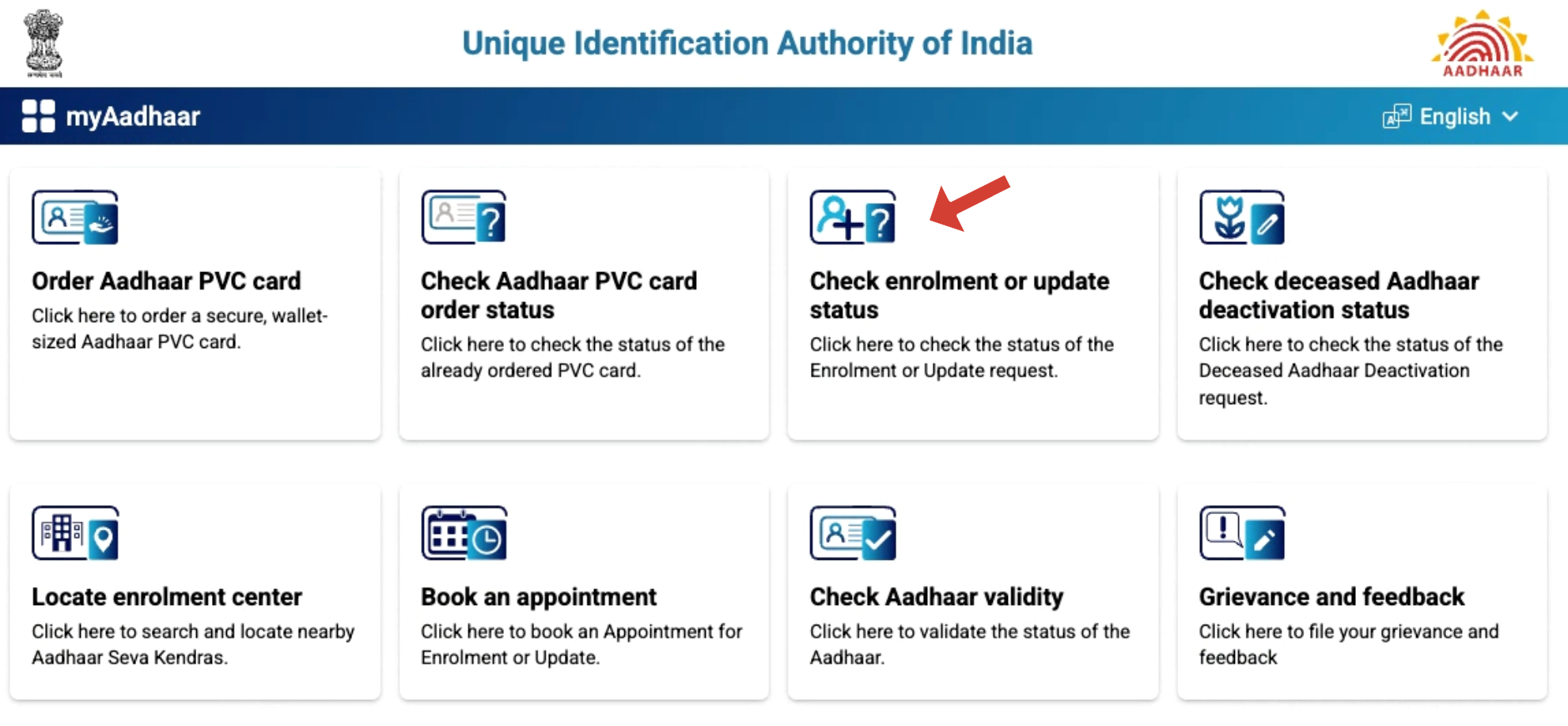
- Go to the myaadhaar.uidai.gov.in and click on the “Check Enrolment/Update Status” icon.
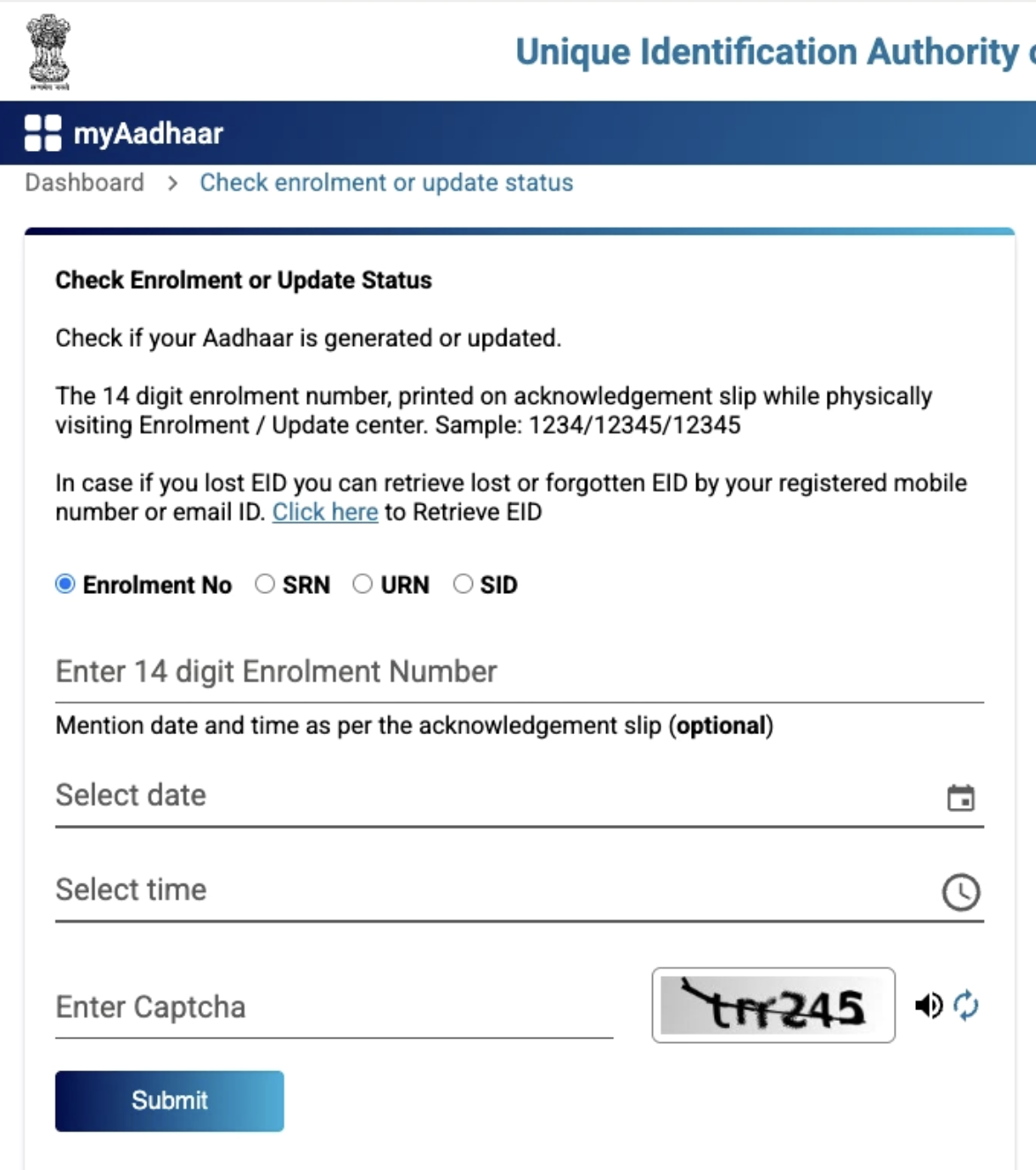
- Enter the 28-digit ID or your SID/SRN, complete the captcha, and you’ll be directed to your application status.
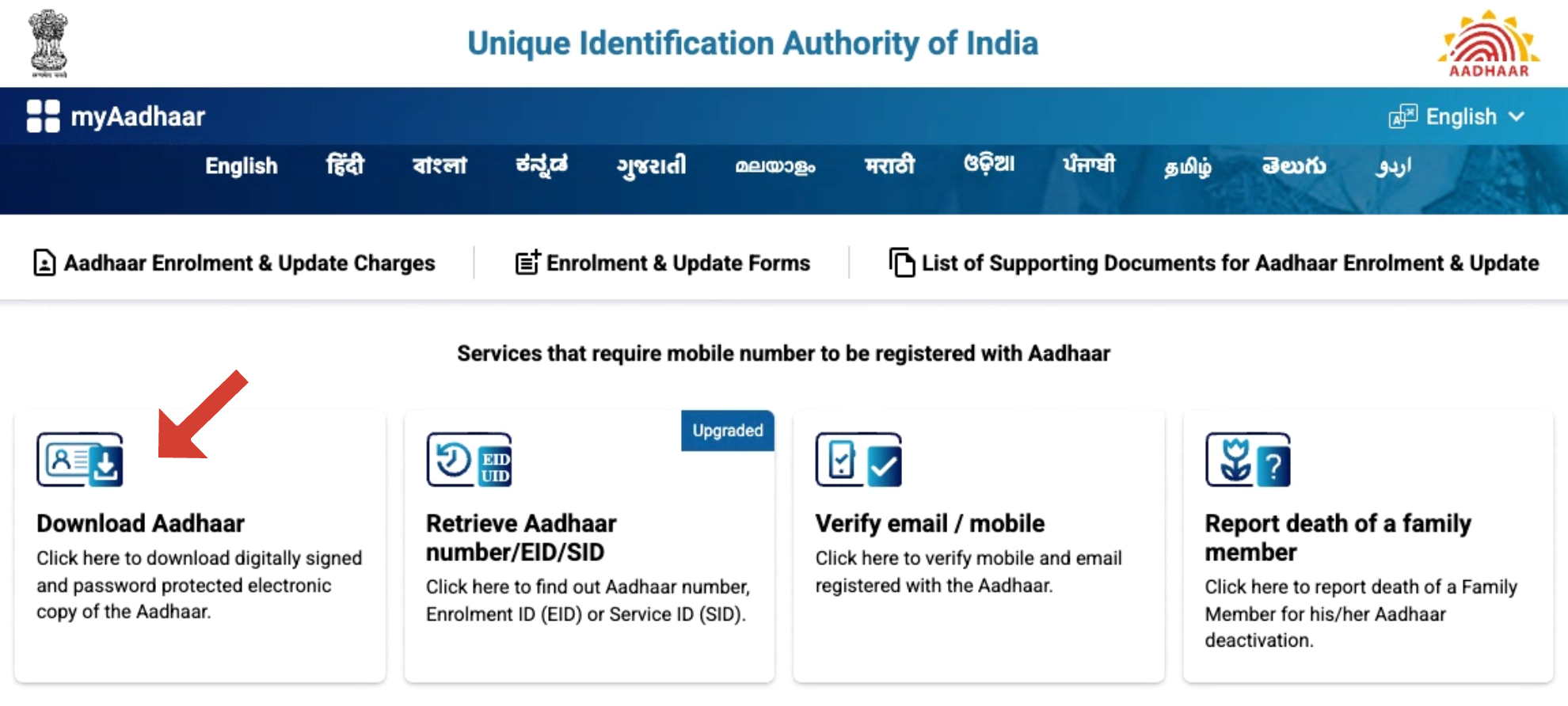
- If it’s approved, go to the main Aadhaar website and click Download Aadhaar.
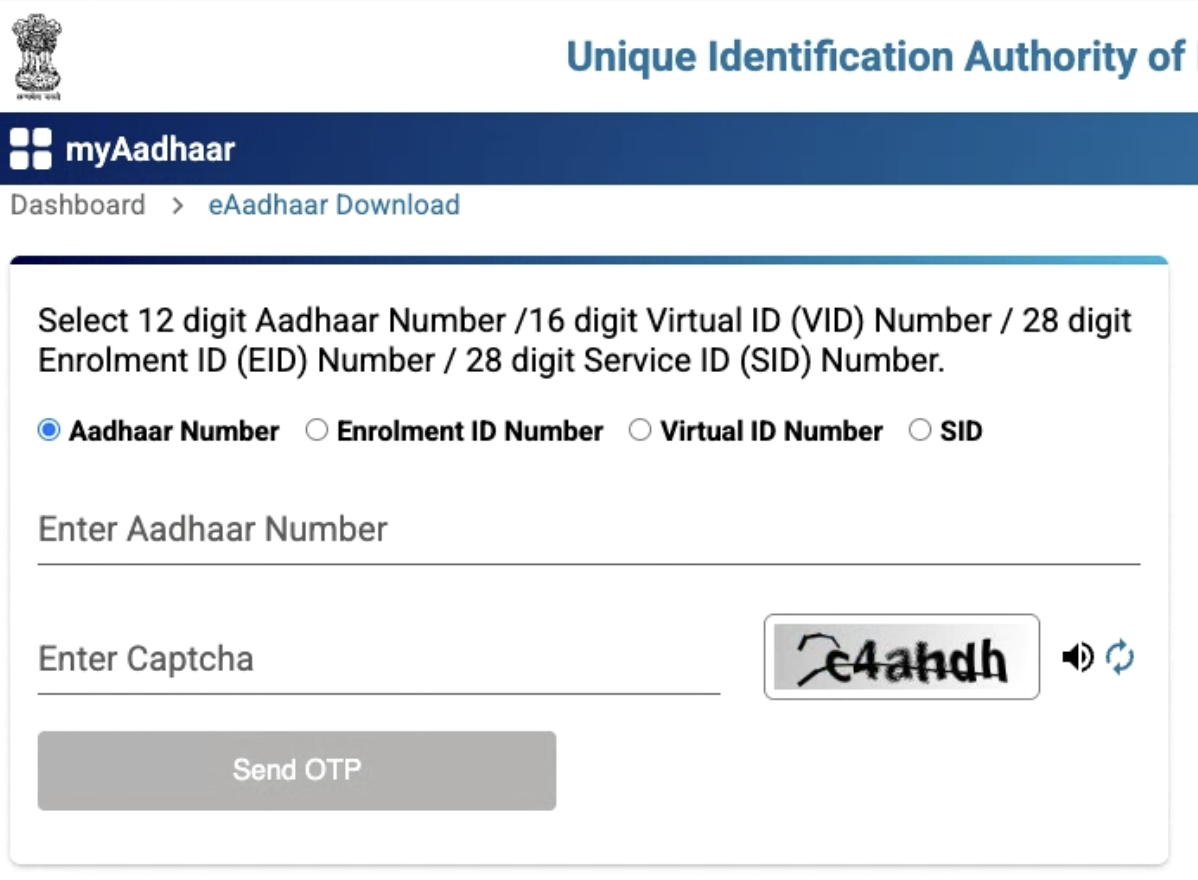
- Input your Aadhaar number, EID, VID, or SID and solve the captcha.
- Clock “Send OTP” and enter the code sent to your registered mobile number.
Note: To get the PVC card, you can simply visit the UIDAI website and click on the “Order Aadhaar PVC Card” service option. Enter your 12-digit ID number and submit a 50-rupee fee. The card will be delivered to your address via speed post soon.
Mistakes to Avoid During Aadhaar Enrolment
To make sure your enrolment gets approved without any hassle, here are some mistakes you should avoid at all costs:
- Never provide incorrect or expired documents, as this can lead to Aadhaar rejection. Always submit original documents to support all shared data for smooth verification.
- Don’t use any salutations such as Ms., Mrs., or Mr. before your name on the application form.
- Don’t make spelling errors and use capital letters while filling out the form for better clarity.
- Avoid giving an incomplete or temporary address, as the Aadhaar card will be delivered to that location, so it must be accurate and up to date.
Conclusion
As an Indian resident, you must learn about Aadhaar enrolment and complete it in a timely manner to access government benefits and relevant services. Just make sure all your documents are accurate and there are no errors in the application to make the whole process quick and smooth.
To learn more or get help with downloading, updating, or checking your Aadhaar status, visit My Aadhaar UIDAI Guide — your go-to guide for all things Aadhaar.